Showing posts with label iMIS. Show all posts

Tuesday, August 11, 2009

ASP:Menu will not work with IE8 / Chrome / Safari.

An iMIS Tips and Tricks by Venketesh Subramony

Consultant, BroadPoint Technologies

Please add this in Master Page

<meta http-equiv="X-UA-Compatible" content="IE=EmulateIE7" >

protected override void AddedControl(Control control, int index)
{
if (Request.ServerVariables["http_user_agent"].IndexOf("Safari", StringComparison.CurrentCultureIgnoreCase) != -1)
{
this.Page.ClientTarget = "uplevel";
}
base.AddedControl(control, index);
}

Also use the Browsercap in webconfig

<system.web>
<browserCaps>

<!-- GECKO Based Browsers (Netscape 6+, Mozilla/Firefox, ...) //-->
<case match="^Mozilla/5\.0 \([^)]*\) (Gecko/[-\d]+)(?'VendorProductToken' (?'type'[^/\d]*)([\d]*)/(?'version'(?'major'\d+)(?'minor'\.\d+)(?'letters'\w*)))?">
browser=Gecko
<filter>
<case match="(Gecko/[-\d]+)(?'VendorProductToken' (?'type'[^/\d]*)([\d]*)/(?'version'(?'major'\d+)(?'minor'\.\d+)(?'letters'\w*)))">
type=${type}
</case>
<case> <!-- plain Mozilla if no VendorProductToken found -->
type=Mozilla
</case>
</filter>
frames=true
tables=true
cookies=true
javascript=true
javaapplets=true
ecmascriptversion=1.5
w3cdomversion=1.0
css1=true
css2=true
xml=true
tagwriter=System.Web.UI.HtmlTextWriter
<case match="rv:(?'version'(?'major'\d+)(?'minor'\.\d+)(?'letters'\w*))">
version=${version}
majorversion=0${major}
minorversion=0${minor}
<case match="^b" with="${letters}">
beta=true
</case>
</case>
</case>

<!-- AppleWebKit Based Browsers (Safari...) //-->
<case match="AppleWebKit/(?'version'(?'major'\d?)(?'minor'\d{2})(?'letters'\w*)?)">
browser=AppleWebKit
version=${version}
majorversion=0${major}
minorversion=0.${minor}
frames=true
tables=true
cookies=true
javascript=true
javaapplets=true
ecmascriptversion=1.5
w3cdomversion=1.0
css1=true
css2=true
xml=true
tagwriter=System.Web.UI.HtmlTextWriter
<case match="AppleWebKit/(?'version'(?'major'\d)(?'minor'\d+)(?'letters'\w*))(.* )?(?'type'[^/\d]*)/.*( |$)">
type=${type}
</case>
</case>

<!-- Konqueror //-->
<case match=".+[K|k]onqueror/(?'version'(?'major'\d+)(?'minor'(\.[\d])*)(?'letters'[^;]*));\s+(?'platform'[^;\)]*)(;|\))">
browser=Konqueror
version=${version}
majorversion=0${major}
minorversion=0${minor}
platform=${platform}
type=Konqueror
frames=true
tables=true
cookies=true
javascript=true
javaapplets=true
ecmascriptversion=1.5
w3cdomversion=1.0
css1=true
css2=true
xml=true
tagwriter=System.Web.UI.HtmlTextWriter
</case>

<!-- Opera //-->
<case match="Opera[ /](?'version'(?'major'\d+)(?'minor'\.(?'minorint'\d+))(?'letters'\w*))">
<filter match="[7-9]" with="${major}">
tagwriter=System.Web.UI.HtmlTextWriter
</filter>
<filter>
<case match="7" with="${major}">
<filter>
<case match="[5-9]" with="${minorint}">
ecmascriptversion=1.5
</case>
<case>
ecmascriptversion=1.4
</case>
</filter>
</case>
<case match="[8-9]" with="${major}">
ecmascriptversion=1.5
</case>
</filter>
</case>
<case match="Chrome/(?'version'(?'major'\d+)(?'minor'\.\d+)\.\d+.\d+)\sSafari/\d+\.\d+">
browser=Chrome
version=${version}
majorversion=${major}
minorversion=${minor}
</case>
</browserCaps>
<system.web>

Thursday, August 6, 2009

Write a WebService using your notepad


An iMIS Tips and Tricks by Venketesh Subramony

Consultant, BroadPoint Technologies


You can write a webservice using a notepad editor. Also you can test this using your browser.

You can even test the webservice by browsing the asmx page in the browser.

<%@ WebService Language="C#" class="MyWebService" %>

using System;

using System.Web.Services;

using System.Web;

using System.Web.MySecureInfo;

using System.Web.UI.WebControls;

using System.Data;

using System.Data.SqlClient;

using System.Configuration;

public struct MyInfo

{

public string variables;

}

[WebService(Namespace="http://microsoft.com/webservices/")]

public class MyWebService : WebService

{

private MyInfo MySecureInfo;

public MyWebService()

{

MySecureInfo.variables = "";

}

private void AssignValues(string variables)

{

try

{

// your code

}

catch

{

MySecureInfo.variables= variables;

}

}

[WebMethod(Description="This method call will get the company name and the price for a given MySecureInfo pID.",EnableSession=true)]

public MyInfo GetMyInfo(string pUserid,string pPassword)

{

AssignValues(pUserid,pPassword);

MyInfo MySecureInfoDetails = new MyInfo();

MySecureInfoDetails.variables = MySecureInfo. variables;

return MySecureInfoDetails;

}

}

Tuesday, August 4, 2009

Webservice Easy to implement using JQuery.

An iMIS Tips and Tricks by Venketesh Subramony
Consultant, BroadPoint Technologies

The jQuery code is very simple and easy to learn.

Here are the features of jQuery

1. DOM element selections functions

2. DOM traversal and modification

3. Events

4. CSS manipulation

5. Effects and animations

6. Ajax

7. Extensibility

8. Utilities - such as browser version and the each function.

9. JavaScript Plugins

POST Method

function InfoByDate(sDate, eDate){
var divToBeWorkedOn = '#AjaxPlaceHolder';
var webMethod = 'http:// WebService/Web.asmx/GetInfoByDates'
var parameters = "{'sDate':'" + sDate + "','eDate':'" + eDate + "'}"
$.ajax({
type: "POST",
url: webMethod,
data: parameters,
contentType: "application/json; charset=utf-8",
dataType: "json",
success: function(msg) {
$(divToBeWorkedOn).html(msg.d);
},
error: function(e){
$(divToBeWorkedOn).html("Unavailable");
}
});


GET Method

$.get("http://doman.com/webservice.asmx", { name: "John", time: "2pm" },
function(data){
alert("Data Loaded: " + data);
});

Thursday, July 16, 2009

Referral Program offers customers $50 AMEX Gift Cards

Our BroadPoint Referral Program has kicked off this week!

You remember what it was like not to have instant access to information through Smartlists, how long it took to close the books each month and how many clicks it took get to the transaction.

You probably have friends and associates that are still struggling with those same issues that are looking for solutions.

couple

If you want to help your connections enjoy the same benefits that you do, we’ll thank you for a referral with a $50 AMEX gift certificate. If they are not currently a BroadPoint client and are interested in talking to us, you will have 50 thank you’s to spend.

If you have a contact that would benefit from working with BroadPoint Technologies, then let us know at www.Broadpoint.net/connections. We'll contact you & if your contact is interested in hearing from us then we will thank you with a $50 AMEX Gift Card.

Tuesday, July 7, 2009

New iMIS Discounts available

Technorati Tags: ,

In recognition of the significant and unique economic challenges facing our customers this year, BroadPoint would like to inform you of several discounts that ASI is offering through September 30, 2009.

Now is the time to upgrade to iMIS 15, purchase additional modules and users, and host your iMIS system at a secure reliable facility. This is a one-time, can’t miss opportunity to invest in your iMIS system and infrastructure! A variety of discounts are being offered through September 30, 2009.

· Upgrade to version 15.1 and receive a discount on additional users (Full/Casual or Public) up to 60% and get the new iCreate Advanced Tools for free! If you are already on 15.0 you can still add users at a discount.

· Purchase multiple iMIS modules as part of the same sale and receive a discount of up to 20%.

· Host your iMIS 15 system with ASI and save up to 20% on hosting fees!

· Have you fallen behind on your Software Update fees? Get caught up and save 15%.

To take advantage of these discounts contact:

· Huan Mitchell, 301-634-2428, hmitchell@broadpoint.net

· Allison Brown, 301-634-2420, abrown@broadpoint.net

Wednesday, July 1, 2009

New iMIS Training Classes Available!

We are pleased to announce a new iMIS summer training schedule from BroadPoint!

Click on a class below for more information or to register. If you have any questions please call Elaine Crooks at (301) 634-2463

Date

Course Name

Location

Duration

Price

Link to Register

7/9/2009

Basic Crystal Reports for iMIS

Bethesda, MD

1 Day

$500

Register

7/30/2009

Fine-Tuning iMIS

Bethesda, MD

1 Day

$500

Register

8/6/2009

iMIS Customer Management Productivity Tools

Bethesda, MD

1 Day

$500

Register

8/13/2009

iMIS Events Module

Bethesda, MD

1 Day

$500

Register

Thursday, June 4, 2009

Upcoming webcast from BroadPoint: Doing More With Less - 10 Ways to Recession Proof Your Organization Using Technology


June 16th, 11:00 am

Member, donor and service organizations face unique challenges in today's economic climate. More and more they are being asked to do more with less. In this one hour webcast, we will share 10 important survival tips on how you can streamline your operations, maximize performance and build stronger relationships with supporters utilizing technology.

Click here to register
You will learn how to increase productivity and gain maximum efficiency throughout your organization by implementing new tools or by expanding the use of your existing technology to bring together key business processes.


Using case studies drawn from our experience implementing and supporting business management software for hundreds of nonprofits, this complimentary webcast identifies solutions that are helping today's most successful organizations enhance their capabilities, control costs and enjoy continued growth.


Monday, June 1, 2009

iMIS 15.1 is here!

Questions? Contact Allison Brown at BroadPoint Technologies (301) 634-2420

As an iMIS provider, BroadPoint Technologies is proud to announce that iMIS 15.1 is now available! iMIS 15.1 provides unprecedented flexibility by providing a platform for web publishing of any existing iMIS functionality to provide all your users a unique web experience.

Important Payflow Pro Notice
Upgrade Now! Credit Card processing may stop working in September. If you use iMIS Credit Card Authorization modules (Service Central, Credit Card Authorization, e-Series, or iBO) then you MUST be on 10.6.30.17 or iMIS 15 by August 31, 2009. PayPal is removing support for v2/v3 of Payflow Pro in August 2009.

iCreate — The Power to Simply Extend iMIS
iMIS 15.1 introduces iCreate, a new suite of tools for tailoring and extending iMIS. iCreate combines existing and new tools into:

iCreate Standard Tools (included with iMIS 15.1)

  • Site Designer – Tailor iMIS navigation and menu options.
  • iMIS Query Architect (iQA) – Create complex queries and reports accessible from anywhere in the iMIS system.
  • Customizer – Add custom fields and screens to the iMIS system.
  • Document System – Administer iMIS system folders and objects.

iCreate Advanced Tools (included with iMIS 15.1 if you are currently on iMIS 15 or upgrade to iMIS 15 in 2009)

  • Content Designer – Publish iMIS functionality to your website and tailor iMIS Staff and Public Views, regardless of the web content management system you use.
  • Business Object Designer – Create new views within iMIS to meet your organization's unique requirements.

More Great iMIS 15.1 Improvements

  • Web Content Management - Create, categorize, and manage web content across multiple websites with this pure ASP.NET replacement for e-Content Manager.
  • Communities – Provide forums, document libraries, blogs, and wikis with this pure ASP.NET replacement for e-Communities.
  • Microsoft Reporting Services (SSRS) 2005 & Integrated IQA Reporting - iMIS 15.1 supports Microsoft SQL Server Reporting Services 2005 and ships with several sample reports. This free reporting tool allows dynamic reporting directly from IQA.
  • iBO for .NET - iMIS 15.1 includes formal support for iBO for .NET. iBO for .NET enables you to develop .NET-based applications that interact with the iMIS 15 database while conforming to iMIS business rules, thereby ensuring the integrity of your data.
  • Public View Updates – Public View updates include company roster view and edit, new directory and committee listing options, online donations, and backorder support.

To learn more about what's new with iMIS 15.1 download the release documentation or view the What's New with iMIS 15.1 Recorded Webcast.


Tuesday, May 19, 2009

Recent awards from ASI

BroadPoint was recently awarded the Chairman’s Circle and New Sales Leader of the Year at ASI’s Annual iNNOVATIONS Partner Conference.

We work hard to get recognized as an outstanding organization whenver possible. This is a great honor for us and we are very excited to announce. For the whole story click here.

Monday, April 13, 2009

Parkinson's Law applied to Project Management

By Todd Hager, Vice President at BroadPoint Technologies

Cyril Northcote Parkinson posits in a 1995 essay for The Economist that, “Work expands so as to fill the time available for its completion.” He went on to provide a mathematical equation that was used to show the rate at which bureaucracies bloat over time. (I love Wikipedia..)

What is the implication for completion times of project tasks? Assume that a particular task estimated to take 7 days actually is completed in four days, does the performer deliver it to the next resource person? Not likely. Because the time estimates given are negotiated numbers, reporting an early finish of a task means that future estimate given by the project worker will be trimmed by the manager.

To avoid this possibility, rather than report early task completion, the worker is likely to spend the extra time performing checks and adding nice to have "bells and whistles" not strictly required by the specifications. Result? Extra time gained is wasted. The key here is to be aware of this phenomenon and guard against it by getting early completions identified, taking advantage of the resulting schedule slack.

BroadPoint consultants and project managers strive to complete projects on time and on budget while at the same time keeping a steady eye on the momentum of the work to gauge how best to achieve the greatest results in the least time regardless of the plan.

---------------------------------------------------------------------
For more from Todd Hager please visit his blog.

Friday, April 3, 2009

Creating iQA Business Objects from User Defined tables

A frequently asked question from clients starting out with the iQA query tool is:

“I’d like to join the CSContact object to the User Defined table (ex. Demographics) but don’t see anything in the iQA ‘Common’ list of objects or anywhere else. How do I get Demographics (or any other table that isn’t in an object) into a query object?”

From the iMIS 15-iSA tab (accessible to iMIS system administrators) click the 'User Defined Tables' item on the left nav menu....

then click the 'Build All' button

Your user Defined tables should then appear as business objects available for use in iQA queries.

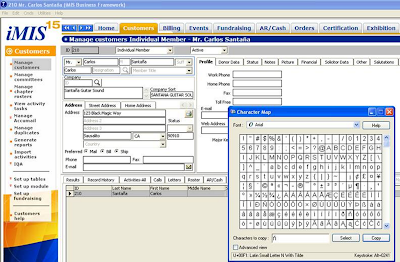
iMIS: To insert special foreign language characters


To insert special foreign language characters …


Character Map


Locate the desired character


Click ‘Select’


Click ‘Copy’


Then paste (Ctrl+V or Edit>Paste) the special character into the necessary field position.Note: The alternate keystroke entry option of the Alt key + number sequence for special character entry.


Note: On my Dell D630laptop I do not have a dedicated 10-key number pad…to use the ALT+0241 keystroke command to insert the “ñ”.


For example I have to turn on the ‘number lock’ then holding down the ‘Fn’ key and the ‘Alt’ key simultaneously enter the numbers 0-2-4-1 on the letter keys (m-k-u-j) that also serve as an embedded 10-key number pad…the standard laptop number/symbol keys DO NOT WORK…going to the Character map and copying the special character is easier…each laptop is independently owned and operated..actual mileage may vary…see participating McDonalds for availability in your area…


Character Map Overview

You can use Character Map to view the characters that are available in a selected font. Character Map displays the following character sets: Windows, DOS, and Unicode. You can copy individual characters or a group of characters to the Clipboard and paste them into any program that can display them. Or, depending on the program you are using (such as WordPad), you can even copy characters by dragging them from Character Map directly into an open document.Using Character Map, you can search for characters by Unicode character name or Unicode subgroup (such as arrows or mathematical operators) or by other special classifications.


You can also use Character Map to view and copy private characters that you have created using Private Character Editor. If you know the Unicode equivalent of the character you want to insert, you can also insert a special character directly into a document without using Character Map. To do so, open the document and position the insertion point where you want the special character to appear. Then, with NUM LOCK on, hold down the ALT key while using the number pad keys to type the Unicode character value.


International characters
Environment: WIN_SQLSERVE:Version: 4.29.17.02Module:SYSTEM

Description: Can iMIS support International (foreign language) characters?

A. iMIS supports International characters like ñ. ç, é, è, ò, etc. These characters are supported via the font and inserted by keystroke combinations. To determine what keystrokes will insert a specific character, go to Start>>Programs>>Accessories>>Character Map.

Keywords: foreign characters French letters


Why Should Our Organization Invest in a Social Networking Tool When We Can Use Facebook for Free?

As you discover the new world of social media and social networking and evaluate whether it’s even good for your organization, you may be asking yourself this very question. Most organizations are very excited by the use of social networking tools and offering this powerful tool to their constituents, but most often ask the following questions:

1. Especially in these tough economic times, why would I invest in a social networking tool for my organization when I can offer it to them for free through facebook?

2. Will my constituents/customers use this tool? Our constituents are not in their 20’s….

Consider the following in your evaluation of social networking tools for your organization:

We think Facebook is a great tool for organizations to reach out to large numbers of potential new members/customers, and encourage organizations to consider using Facebook for that purpose. Then, once users are interested in the organization, they should be redirected to join the organization’s own Social Networking community site.

Facebook is a purely social networking site, and was not designed or intended to be an organizational or business environment. The Facebook groups functionality is really designed primarily to let friends touch base with one another. It’s terrific for that! But, it’s lacking most of the collaboration and communication tools included with more professional social networking applications that are so valuable to an organization and its members/customers. With Facebook:
• There’s no bridge to your internal database. So, no single sign on; no coordination of profile information; and no linking of groups.
• The users are on Facebook’s website. They’re not within the organization’s website environment.
• The organization may not even get credit in the eyes of the participants, because anyone could set up a Facebook group for that organization’s constituents.
• There is no email listserv (probably the most-used feature of professional social networking tools).
• There’s no library for sharing documents (other than photos and videos).
• There’s no wiki for collaborating together on a document.
• There are no administrative reports or administrative controls.
• The discussion board allows nothing but plain text, instead of the feature-rich WYSYIWYG editor and the ability to embed images and attach documents that professional social networking tools provide.
• There are no personal or group blogs.
• There is no search capability—an almost fatal lack for any real business use. How can participants use it to share knowledge effectively if they have no way to find that knowledge?
• There is no flexibility of set up (as compared to the hundreds of configuration options in professional social networking applications).
• And, finally, there’s no real branding for the organization other than a logo.

All of those features are included in a professional Social Networking application and more.

Another very important differentiator is the treatment of data and privacy. The data in Facebook is subject to Facebook’s terms of service which give it much more control than a business organization would want. Facebook just recently tried to assert that they owned all of the content created or uploaded by users, and could use it for any purpose they wanted! That effort was beaten back, but there’s no certainty that they won’t find some other way to use users’ data.

In addressing the concern as to whether your constituents (especially those over the age of 20) will use a professional social networking tool offered by your organization, consider the following information reported by GuideStar and gathered through a Deloitte survey:

Social media is here to stay. A survey by Deloitte reported that 43 percent of Internet users over the age of 61 spent time sharing photographs with people. Some 36 percent watched and read personal content created by others. And surprise: the average blogger is a white, 37-year-old male with an average annual income of nearly $56,000. For organizations, that profile is prime for targeting as a potential customer, member, or donor.

Soroptimist on BroadPoint Implementation

Tim Riley, former IT director for Soroptimist International speaks about his experience with iMIS and a BroadPoint implementation.

"I think the key to the upgrade process is having a really good reseller who know s the upgrade process and has done it with previous customers”


“Overall we are very satisfied with the implementation it went on time and BroadPoint Technologies our reseller, did a great job of doing our data conversion and getting us live when we expected.”

To learn more about what a BroadPoint implementation of iMIS can do for your organization please give us a call at 1-888-920-2784 or email Allison Brown.

Meet Allison Brown


Hi Everyone,This is Allison Brown and I am a Account Executive at BroadPoint Technologies in Bethesda, MD. I focus on providing business management software to Not-for- Profit organizations. Previously, I spent a number of years implementing crm, accounting and e-marketing solutions.

In light of the current economic climate, I focus on helping organizations to do more with less resources utilizing technology. Not-for-Profit organizations have more limited funds with donations down, professional memberships more scrutinized, and possible reductions in force. As a result, success in 2009 is dependent on the ability for organizations to provide high value at a low cost.

I hold regular webinars and presentations to our customers and prospective customers on how you can utilize technology ( much of which you may already own) to achieve success in 2009!

Please contact me or sign up on our website through the ‘Events’ page.
Look forward to discussing with you!

Allison Brown

Welcome to BroadPoint's Tech Topics!

Hello and welcome to BroadPoint's Tech Topics Blog. My name is Elaine Crooks, and I am the Marketing Manager her at BroadPoint. We will be using this blog to communicate faster and less formally with our clients and colleagues.

Tech Topics is designed to be an outlet for our intelligent consultants to share ideas, best practices, opinions and news. So while topics may vary they will (almost) always be interesting to someone!

Please come back often for tips and tricks using several different systems ranging from Microsoft Dynamics GP, and CRM to ASI’s iMIS. Or look at custom solutions we have built for organizations just like yours!

We will also announce events like free training webinars and webcasts and let you know when we will be attending events and conferences (because where we are is a hot topic – we know).

Thanks for visiting, come back often - and if you are interested in BroadPoint Technologies for any membership management, accounting, or customer relationship management solutions please do not hesitate to visit our website www.broadpoint.net or call 1-888-920-2784!

Add this

Bookmark and Share